




Workforce attendance command center

Know who worked,
prove where, and
close payroll faster.

ProjectCrew brings schedules, office and mobile check-ins, location proof, approvals, rates, overtime, incidents, and payroll exports into one system for teams that work at desks, on site, or on the move.

Attendance proof

Office, GPS, geofence, photo, and offline check-ins.

Labor cost control

Rates, overtime, breaks, approvals, and payroll runs.

Audit-ready exports

Payroll packages, attendance audits, and exception files.

Live workforce

North Zone Operations

Live

24

Scheduled

21

Checked in

3

On break

Attendance audit

GPS + photo proof captured

Verified
Approved hours

312h

Payroll package

Ready

The problem

Attendance and payroll get expensive when check-ins, approvals, and payroll live in separate places.

!

Hours are hard to prove

Manual sign-in sheets, chat updates, and paper timesheets leave managers guessing who was actually working.

!

Payroll exceptions pile up

Missing checkouts, no-shows, unpaid breaks, and overtime disputes slow the close.

!

Costs are unclear until late

Rates, project labor, and overtime need to be visible before payroll is finalized.

!

Work updates get scattered

Incidents, tasks, handoffs, photos, and schedule changes disappear across messages.

How it works

From check-in to approved payroll record.

ProjectCrew keeps attendance workflows simple while giving managers the records they need to approve hours, resolve exceptions, and export clean data.

1

Plan shifts and assign people

Create teams, schedules, office locations, work sites, supervisors, tasks, and optional geofence rules.

2

Capture proof from any workplace

Employees check in and out from mobile or approved locations with optional GPS, photo proof, break tracking, and offline sync.

3

Approve, lock, and export

Review exceptions, approve shifts and timesheets, calculate regular and overtime pay, then export payroll-ready files.

Why teams choose ProjectCrew

One system for attendance, approvals, work updates, and payroll.

ProjectCrew goes beyond time tracking so office, mobile, and site-based teams can control labor cost, handle requests, document work, and export audit-ready data.

Proof of attendance

Office locations, GPS coordinates, geofences, photo check-ins, offline sync, and manual adjustment history.

Labor cost control

Base rates, project rates, overtime rules, break minutes, earnings snapshots, and payroll runs.

Exception management

No-shows, missing checkouts, overtime requests, time-off approvals, and stuck timesheets.

Work documentation

Incident reports, progress notes with images, schedule tasks, and project photo records.

Team communication

Messages, announcements, push notifications, schedule updates, and shift reminders.

Audit-ready exports

Payroll packages, attendance audits, exception reports, and rate history exports.

Who it is for

Built for office, mobile, and site-based teams.

Use ProjectCrew anywhere you need reliable employee check-ins across offices, shifts, sites, routes, or service locations.

Office teams

Office teams

Employee check-ins, check-outs, breaks, and approved hours.

Cleaning and facilities

Cleaning and facilities

Sites, shifts, attendance, and service records.

Security teams

Security teams

Post coverage, check-ins, and location proof.

Mobile service teams

Mobile service teams

Routes, customer sites, job progress, and attendance.

Construction crews

Construction crews

Projects, incidents, progress photos, and payroll.

What you get

A practical operating system for every work location.

Simple tools for employees, structured controls for managers, and exportable records for payroll and audits.

Scheduling and team assignments

Assign employees, supervisors, teams, and tasks across offices, projects, and shifts.

Office, GPS, and photo check-ins

Record time, work location, geofence compliance, and optional photo proof from mobile.

Offline attendance sync

Let employees record check-ins and check-outs when signal is poor, then sync later.

Timesheets and shift approval

Turn attendance into reviewable timesheets with approved, locked records.

Rates, overtime, and payroll runs

Manage base rates, project rates, overtime policy, earnings, and payroll periods.

Time-off and overtime requests

Keep approvals visible before they affect staffing, hours, or payroll.

Incidents and progress reports

Capture severity, notes, dates, photos, and project progress from the workplace.

Announcements and messaging

Send schedule changes, pinned announcements, reminders, and direct messages.

Analytics and report exports

Track attendance rate, no-shows, missing checkouts, overtime, labor cost, and payroll pipeline.

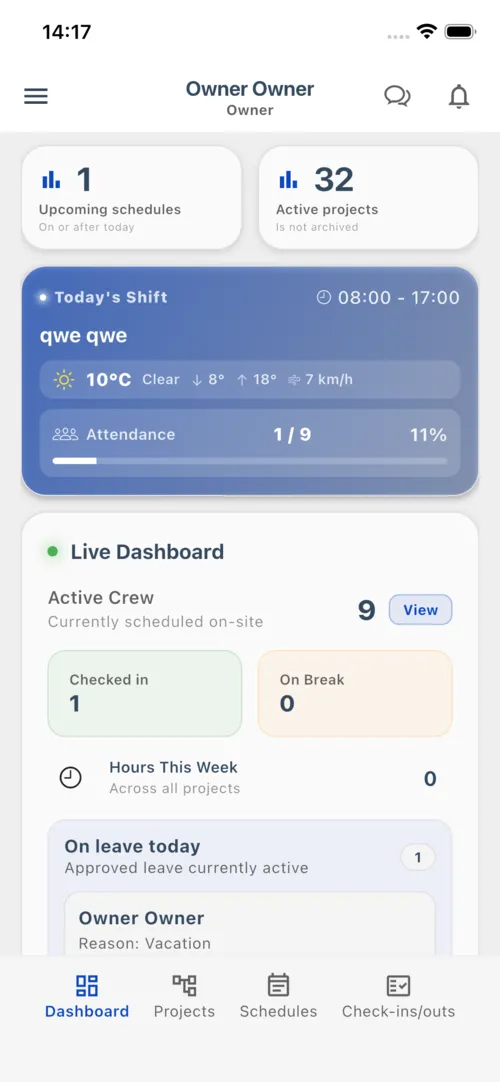
Manager app screenshot
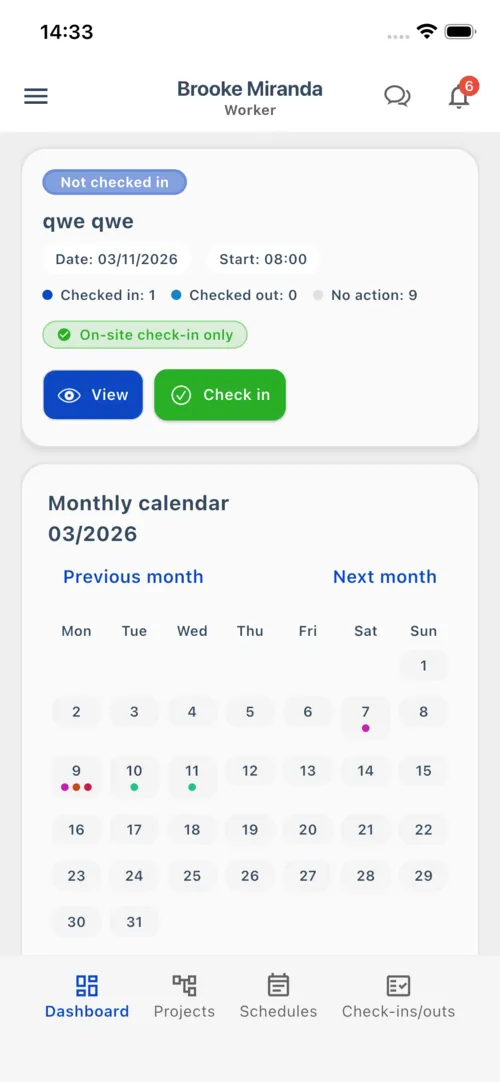
Employee app screenshot

Mobile first

Simple for employees. Clear for managers.

Employees use the mobile app to see schedules, check in, check out, view hours, submit requests, report incidents, and stay updated. Managers get the visibility they need without chasing updates.

  • βœ“

    Fast check-in/out

    One tap records time and location, with photo proof when required.

  • βœ“

    Offline-ready attendance

    Check-ins and check-outs can be saved on device and synced when the connection returns.

  • βœ“

    Requests and alerts

    Time off, overtime, announcements, messages, and notifications stay connected to the work.

Pricing

Choose individual access or company seat billing.

Individual plans are for one account and are purchased in the mobile app. Company seat billing is for businesses that want centralized web billing for multiple users.

Individual app subscriptions

Weekly, monthly, or yearly access for one user

Use these plans when one person pays for their own ProjectCrew account through the iOS or Android app.

Purchased in the mobile app

Weekly

Short project access for one user

$1.49/week
  • βœ“One individual user account
  • βœ“Scheduling, check-ins, and timesheets
  • βœ“Managed by the App Store or Google Play

Monthly

Best start

Ongoing access for one user

$4.99/month
  • βœ“One individual user account
  • βœ“Better price for ongoing work
  • βœ“Cancel or change in your app store account

Yearly

Lowest individual price for long-term use

$49.99/year
  • βœ“One individual user account
  • βœ“Best value for ongoing operations
  • βœ“Managed by the App Store or Google Play
Get your team set up

Use individual plans when each person manages their own app subscription. Use company seat billing when the business wants to pay for multiple users from one web account.

Stop guessing. Run attendance from approved records.

ProjectCrew gives owners and managers a practical way to see attendance, proof, approvals, labor cost, incidents, and payroll-ready exports in one place.